Introducing SPF, DMARC and BIMI Builders
Writing an SPF, DMARC or BIMI record by hand is easy to get wrong in ways that are hard to spot just by reading the string back. A missing space, a forgotten semicolon, or a tag in the wrong place can silently break the record — and most tools that check published records won't help you before you've published anything.
What's new
Three new tools are now available under Tools → Build:
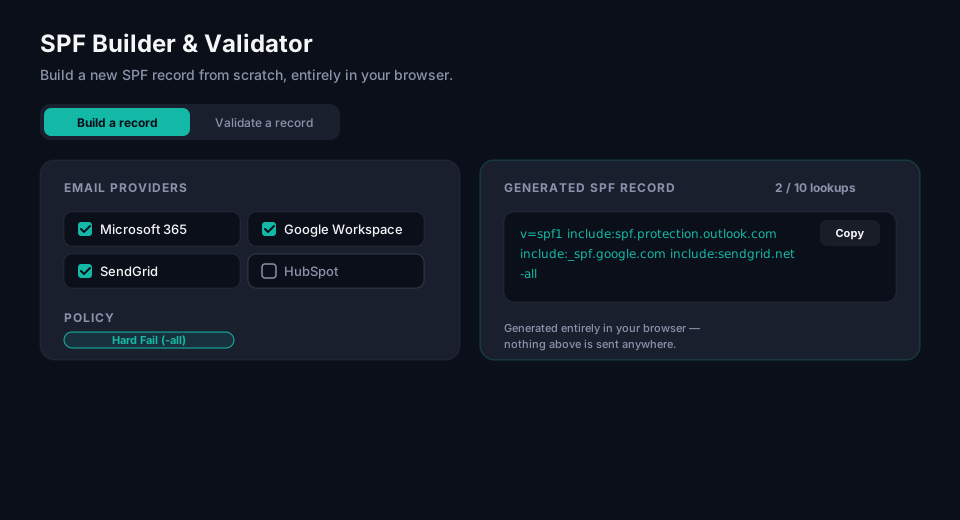
- SPF Builder & Validator — pick the platforms that send mail for your domain, add any custom IPs or includes, and get a ready-to-publish record with a live DNS lookup counter.
- DMARC Builder & Validator — set policy, reporting and alignment with guided defaults, including plain-language warnings before you enable anything with real privacy implications, like forensic reporting.
- BIMI Builder & Validator — assemble a logo and Verified Mark Certificate reference into a valid record.
Each tool has two modes: Build, which generates a record from a form, and Validate, where you can paste a record you already wrote and have it checked against the relevant RFC syntax — including the kind of typo a simple find-and-replace won't catch, like a mechanism glued onto the end of a domain with no space between them.
Why this is different from the existing analyzers
The SPF Analyzer and DMARC Analyzer look up a record that's already live in DNS for a real domain. The new builders don't need a domain at all — everything runs client-side, in your browser. Nothing you type is sent to a server or logged, which makes them a safe place to draft a record before you're ready to publish it.
Try it
Head to SPF Builder, DMARC Builder, or BIMI Builder to get started.
Frequently asked questions
What's the difference between a record builder and a record analyzer?
An analyzer looks up a record that's already published and live in a domain's DNS — it tells you what's actually there and whether it's correct. A builder does the opposite: it generates a record from a form (or validates one you've written) before anything is published anywhere, entirely client-side in the browser. If a domain has no DMARC or SPF record yet, there's nothing for an analyzer to check — a builder is the tool for that starting point.
Is it safe to paste a draft DNS record into an online builder tool before publishing it?
With this tool specifically, yes — the SPF, DMARC and BIMI builders run entirely in the browser, and nothing typed into them is sent to a server or logged. That's a deliberate design choice, not just a privacy nicety: a draft record can reveal internal infrastructure details (mail server IPs, third-party vendors in use) before you're ready to make that public, so a tool that quietly logs what you paste in would be a real exposure. Not every online DNS tool works this way — worth checking before pasting a draft record anywhere.
Why would DMARC's forensic reporting need a plain-language warning before enabling it?
Because forensic reports (the ruf= tag) can include full or partial copies of the failing message itself — headers, and sometimes body content — sent to whatever address is configured, which is a meaningfully bigger privacy commitment than aggregate reports (rua=), which only contain pass/fail counts and sending-source metadata. Most mailbox providers have also stopped sending forensic reports industry-wide over exactly this privacy concern, so enabling ruf= today mostly means configuring a report type that rarely arrives — worth understanding before turning it on rather than assuming more reporting is always better.