Mailchimp SPF Record and DKIM Setup Guide
Mailchimp's SPF record uses include:servers.mcsv.net, and its domain authentication also requires two DKIM CNAME records. This guide covers both — the exact SPF include, the two CNAME records, and what each one actually does.
If you're combining Mailchimp with a primary mail platform like Microsoft 365 or Google Workspace, see those specific guides — SPF and DKIM for Microsoft 365 or SPF and DKIM for Google Workspace — since your SPF record will need to include both.
What you will learn:
- The Mailchimp SPF record and when you need it
- The two CNAME records Mailchimp's domain authentication requires
- Where DMARC fits into Mailchimp's own setup flow
- Common mistakes specific to Mailchimp setups
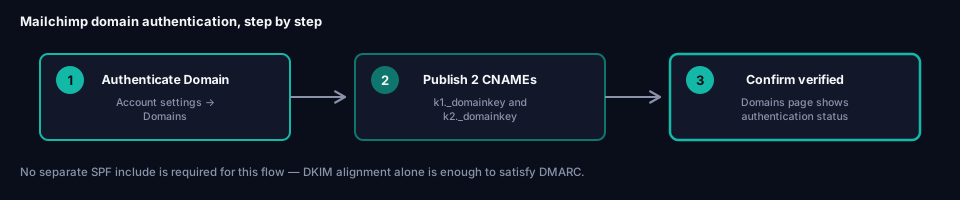
Starting domain authentication in Mailchimp
In your Mailchimp account, go to Domains (under account settings) and choose Authenticate Domain for the sending domain you want to verify. Mailchimp generates two CNAME records unique to your account.
The two DKIM CNAME records
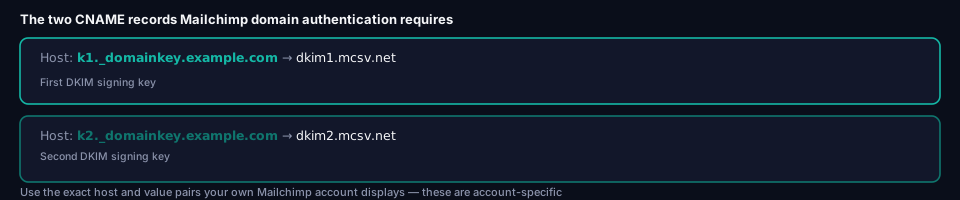
Mailchimp's domain authentication is centered on publishing two CNAME records that handle DKIM signing. The exact values are account-specific, but they follow a selector-based pattern similar to k1._domainkey and k2._domainkey:
Host:  k1._domainkey.example.com
Type:  CNAME
Value: dkim1.mcsv.net
Host:  k2._domainkey.example.com
Type:  CNAME
Value: dkim2.mcsv.net
Use the exact host and value pairs Mailchimp displays in your own account's setup screen rather than these illustrative examples — the selector prefixes and target values are generated per account and won't be identical across different Mailchimp customers. As with any CNAME-based setup, enter only the host portion (k1._domainkey, not the full k1._domainkey.example.com) at DNS providers that automatically append the domain.
The Mailchimp SPF record
Mailchimp sends campaign mail from its own servers, so to authorize that mail under your domain's SPF record you add:
include:servers.mcsv.net
servers.mcsv.net is Mailchimp's sending infrastructure domain (mcsv.net is Mailchimp's dedicated SPF/bounce domain, dating back to its original name, MailChimp Sends Valid). Adding this include authorizes Mailchimp's servers to send mail on your domain's behalf under SPF.
Mailchimp's account setup screen centers on the two DKIM CNAMEs covered above, and doesn't always walk you through adding the SPF include explicitly — since DMARC only needs one of SPF or DKIM to pass and align, DKIM alignment alone can get Mailchimp mail through DMARC even without the SPF include. See Alignment vs Authentication for why that distinction matters. Even so, publishing the SPF include is still worth doing: it's a second, independent authentication path that keeps working even if DKIM signing ever breaks, and it's what most Mailchimp setup documentation and support guidance references.
Combine the include with your other sending platforms — Microsoft 365, Google Workspace, and so on — in a single SPF record. A domain never gets more than one SPF record; every authorized sender's include has to live in that one record:
example.com TXT "v=spf1 include:spf.protection.outlook.com include:servers.mcsv.net -all"
If Mailchimp is your domain's only sender, the record is just:
example.com TXT "v=spf1 include:servers.mcsv.net -all"
The DMARC TXT record Mailchimp may prompt for
Mailchimp's authentication setup can also surface a prompt related to a DMARC record at _dmarc.example.com. If you don't already have DMARC configured on your domain, this is a good moment to set one up — but treat it as your organization's DMARC record, not something owned by Mailchimp specifically. Follow What is DMARC? for a proper rollout starting at p=none, rather than accepting a default value from any single platform's setup wizard, since your DMARC policy needs to account for every sending platform on the domain, not just Mailchimp.
Verifying your setup
Check the DKIM CNAMEs
dig CNAME k1._domainkey.example.com +short
dig CNAME k2._domainkey.example.com +short
Both should resolve to the mcsv.net targets Mailchimp displayed during setup.
Confirm in Mailchimp's dashboard
The Domains page shows an authentication status per domain — it should show as verified once both CNAME records have propagated and Mailchimp's own check succeeds.
Send a real test campaign
Send a test campaign to a mailbox where you can inspect full headers. Confirm dkim=pass appears in Authentication-Results, and that the d= value matches your domain rather than mcsv.net — that's the alignment check that determines whether DMARC will actually pass for Mailchimp-sent mail. See Every DKIM Attribute Explained for exactly where to find the d= tag in a signature header.
Common mistakes with Mailchimp
Skipping the SPF include because Mailchimp's setup screen didn't ask for it. DKIM alone can satisfy DMARC alignment, but leaving include:servers.mcsv.net out of your SPF record means Mailchimp mail has no fallback if DKIM signing ever fails or gets stripped in transit.
Publishing a second SPF record instead of adding the include to your existing one. A domain can only have one SPF TXT record — two records makes SPF fail entirely, for every sender on the domain, not just Mailchimp.
Publishing CNAME records at the wrong host. As with any CNAME-based DKIM setup, whether to include the domain suffix depends on your DNS provider's convention.
Sending from a domain that was never authenticated. If your Mailchimp account sends "from" a domain other than the one you ran authentication for, DKIM alignment fails regardless of how correctly the CNAME records are configured — the signing domain won't match your visible From address.
Treating Mailchimp's DMARC prompt as a complete DMARC setup. A DMARC record needs to account for every platform sending mail as your domain, not just Mailchimp — publish it based on your full sending inventory, not a single platform's suggestion.
Frequently asked questions
Does Mailchimp require an SPF record?
Mailchimp's own setup screen focuses on the two DKIM CNAMEs and doesn't always prompt for an SPF include, but publishing one is still the recommended setup: add include:servers.mcsv.net to your domain's SPF record. DKIM alignment alone can satisfy DMARC, but the SPF include gives Mailchimp mail a second, independent path that keeps working even if DKIM signing breaks.
What is the correct Mailchimp SPF record?
Add include:servers.mcsv.net to your domain's existing SPF TXT record. If Mailchimp is your only sender, the full record is v=spf1 include:servers.mcsv.net -all. If you send from other platforms too, add their includes to the same record — you can only have one SPF record per domain.
What if I use Mailchimp alongside my main business email platform?
Add include:servers.mcsv.net next to your other includes in the same SPF record — for example, v=spf1 include:spf.protection.outlook.com include:servers.mcsv.net -all. Your DKIM setup is independent per platform, though: Mailchimp's CNAMEs coexist with your main platform's DKIM selector without conflict, since DKIM doesn't require consolidation into one record. See the Microsoft 365 or Google Workspace guides if that's your primary platform.
Why did Mailchimp's authentication check fail right after I added the records?
Most likely DNS propagation delay. Wait 15–30 minutes and retry — this is normal and not usually a sign of a misconfigured record.
Should I let Mailchimp's setup flow create my DMARC record?
Treat it as a starting point at most, not a finished configuration. Your DMARC record should reflect every sending platform on your domain, not just Mailchimp — see What is DMARC? for a proper rollout.
Next steps
Once Mailchimp shows verified authentication, check your domain's complete authentication status with grimDMARC's free Domain Scanner. If you're managing several marketing and transactional platforms across many customer domains, Hosted SPF consolidates the ongoing maintenance of combining multiple platforms into one record.
About this guide
This guide was written by the team building grimDMARC — a managed DMARC and SPF platform for MSPs and their customers. If you have questions about Mailchimp authentication or feedback on this guide, reach us at [email protected].
Last updated: August 2026 Reading time: 7 minutes Reviewed by: grimDMARC team